You create. We wrap it.
Multicam podcast editing for the Mac. Drop in your camera and mic files. WrapShot syncs them, cuts between whoever is talking, mutes the filler, and hands back a finished episode: clips, captions and a transcript.
Nothing to buy. Keep the WrapShot Stamp on your exports and that is your contribution.
Your footage never leaves your Mac. Transcription, the cut and the render all run on your machine.
Your part is the review. Mark what is worth clipping, slide a tweak, and the render runs with no queue and nobody to wait for.
Runs on the Mac you already have. Apple Silicon and 8 GB of memory.
What finishing an episode costs now, and what it costs in WrapShot
The usual way
A day. Sometimes two.
Hire an editor
Weekly, that is $5,000 to $8,000 a year.
With WrapShot
One pass, then you publish.
A revision cap is the back and forth, sold by the unit
What stops people hiring editors is rarely the money. It is writing notes, waiting two or three days, and watching a pass from someone who does not know the show, the guest, or what the episode was for. In WrapShot you slide the tweak yourself and watch it apply.
The good conversation stops being the expensive one
Those rates are priced per minute of footage, so a longer episode, or a third guest, costs more to finish. WrapShot costs the same either way. Your part is the review: watching the cut it proposes, marking the moments worth clipping, sliding a tweak or two. Then it renders on your Mac, with no queue.
Editor figures are typical of what freelance listings quote for podcast editing. They vary.
What the job was
None of this is about the edit. The edit was never what killed a show. Not publishing was.
“I want to make four cuts a month without buying a license to do it.”
“I already trim clips on my phone. I do not want to learn a suite that has a certification path attached to it.”
“Two guests, two rooms, two mic setups. I want one show out of that, and I do not want to learn what a compressor is first.”
“I want to stop spending longer explaining a tweak to an editor than the tweak would have taken to do.”
“Fifty dollars, half an hour, up to two feeds. I want to stop hoping nobody interesting turns up.”
“I want to record for as long as the conversation is good, with however many people showed up, and have that not change what it costs me to finish it.”
How it works
One band the Mac handles alone, then two the podcaster does. Stop at any step to change something, then keep going.
What you bring
- The video from every person on the show, however many of them there are
- Recordings that started at different times, which is what normally happens
- A combined video or a combined audio track, if your recording platform made one. Either helps and neither is required
Three passes run on their own. Shown because they take real time, not because there is anything to do.
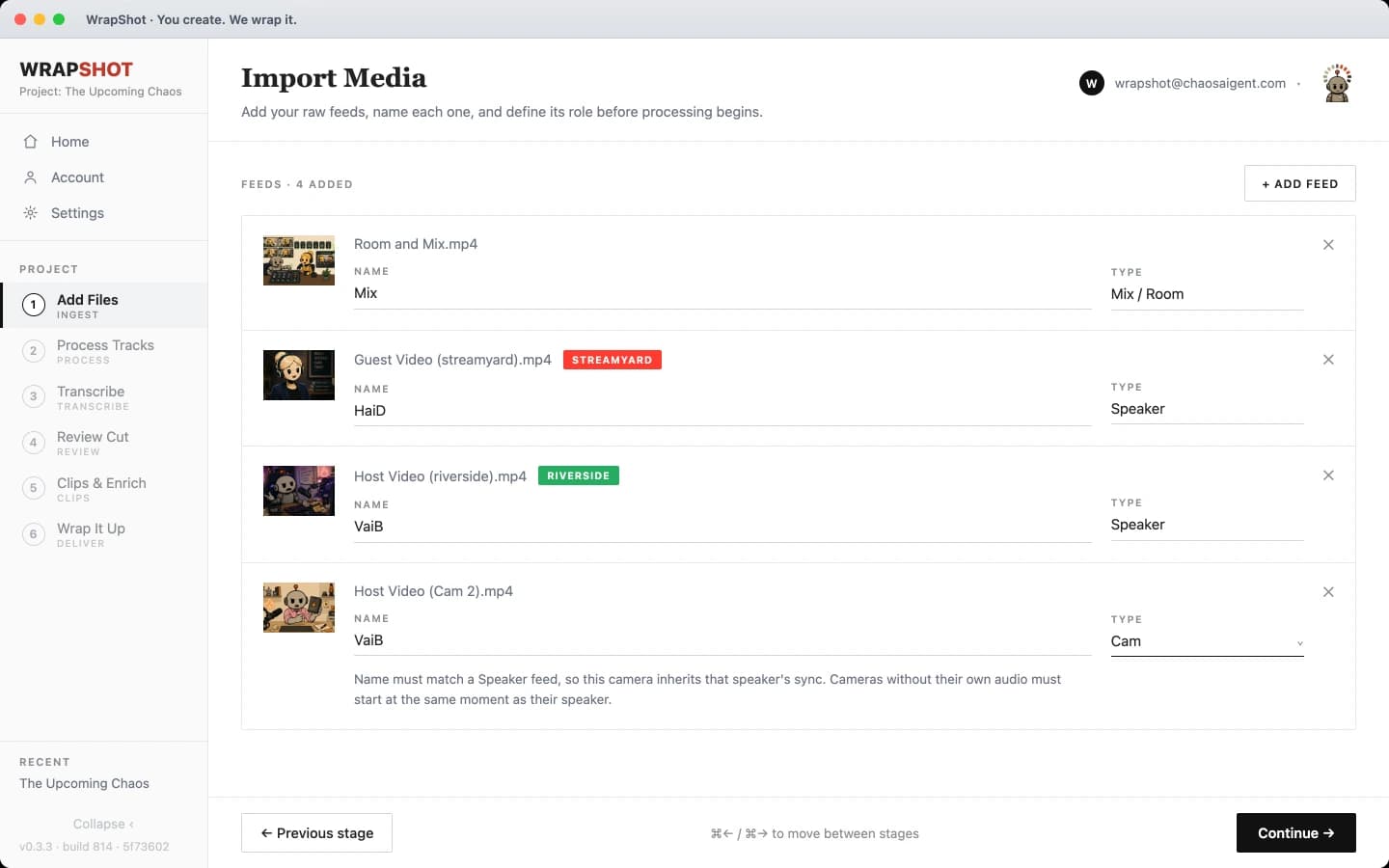
Add Files
Drop the recordings in and say what each one is: a speaker, the room mix, or a camera. Nothing is transcoded yet.
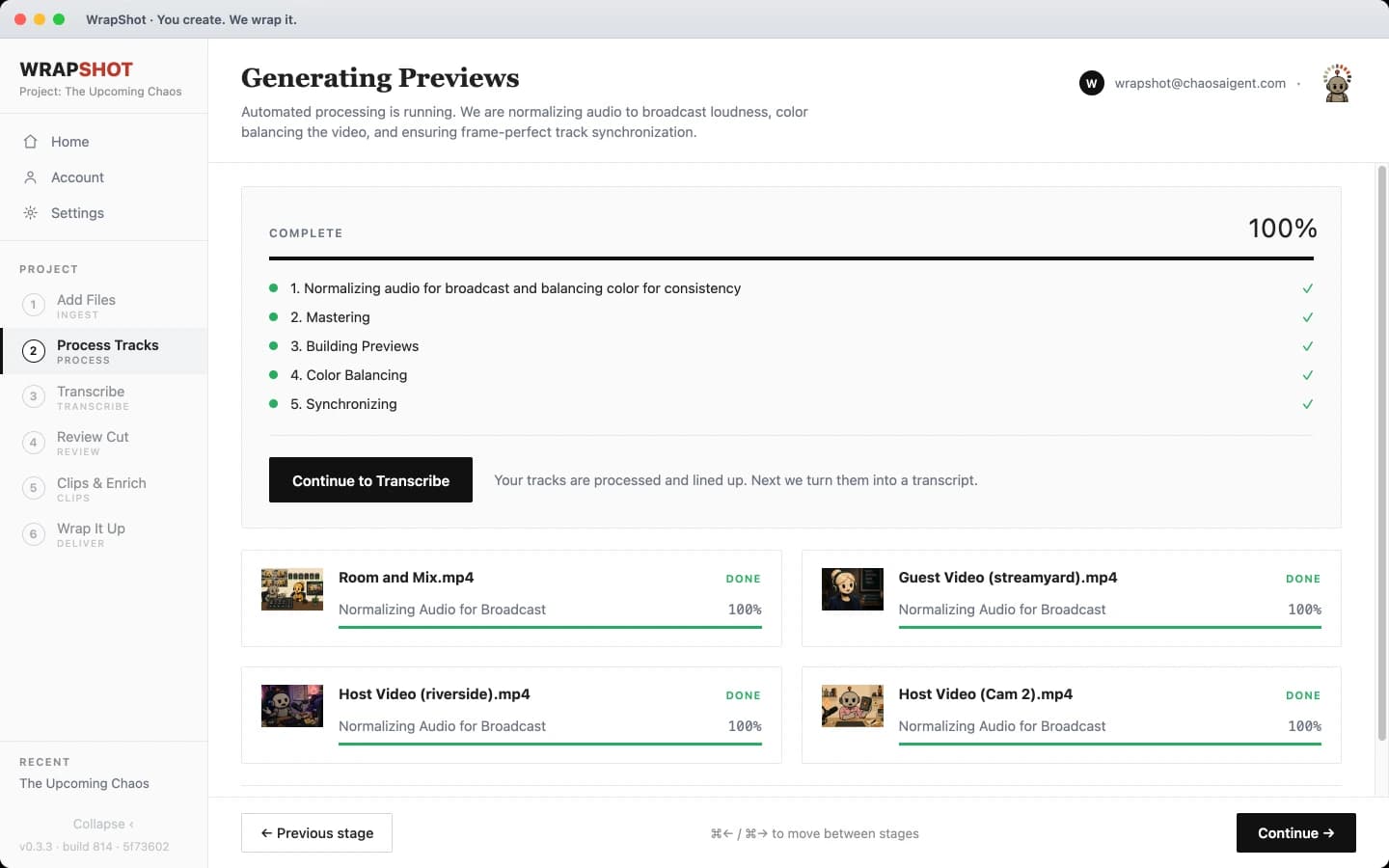
Process Tracks
Loudness, color and previews, handled without you watching.
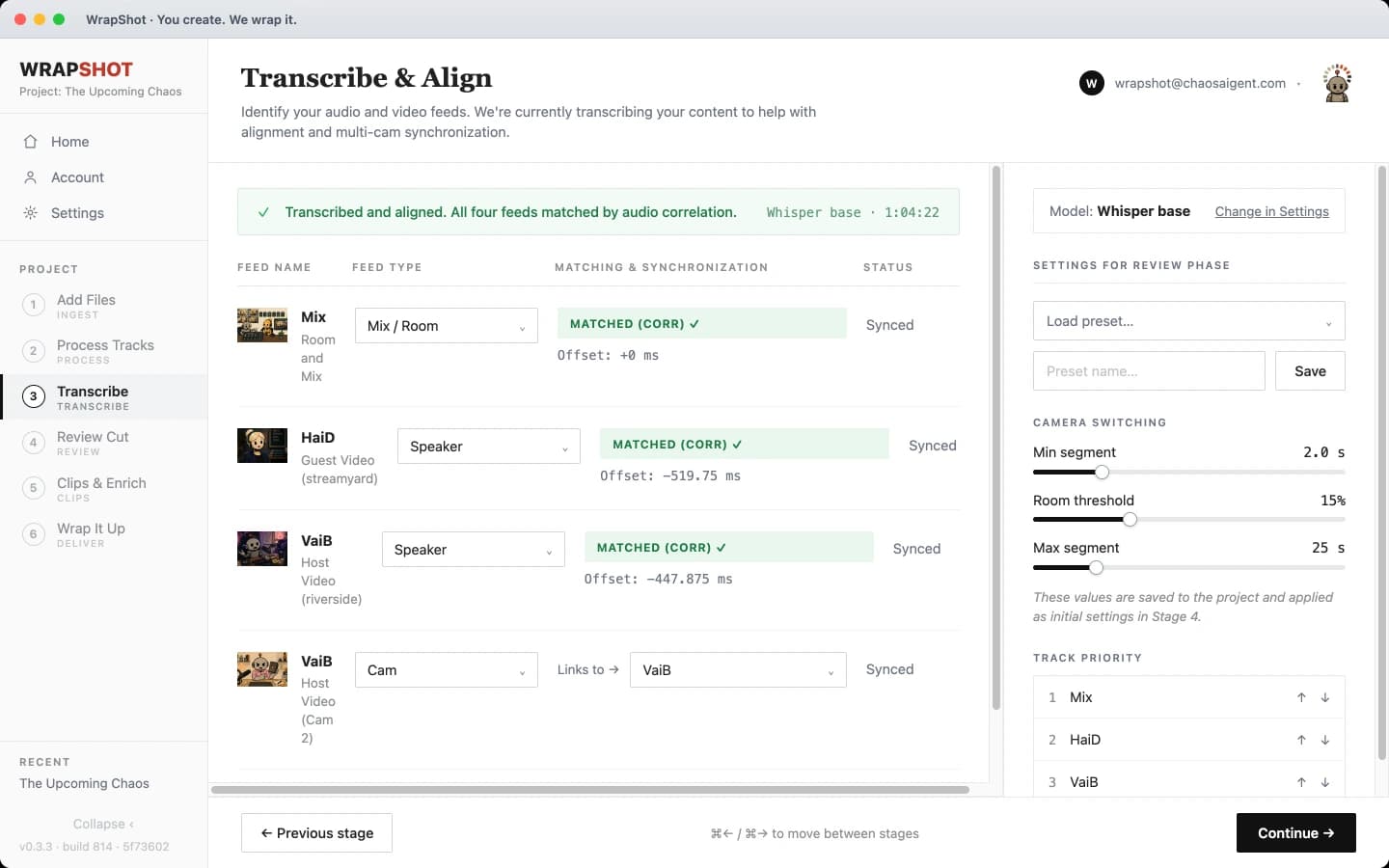
Transcribe & Align
Everyone starts recording at a different moment, so WrapShot listens to the audio and lines every feed up to the same one.
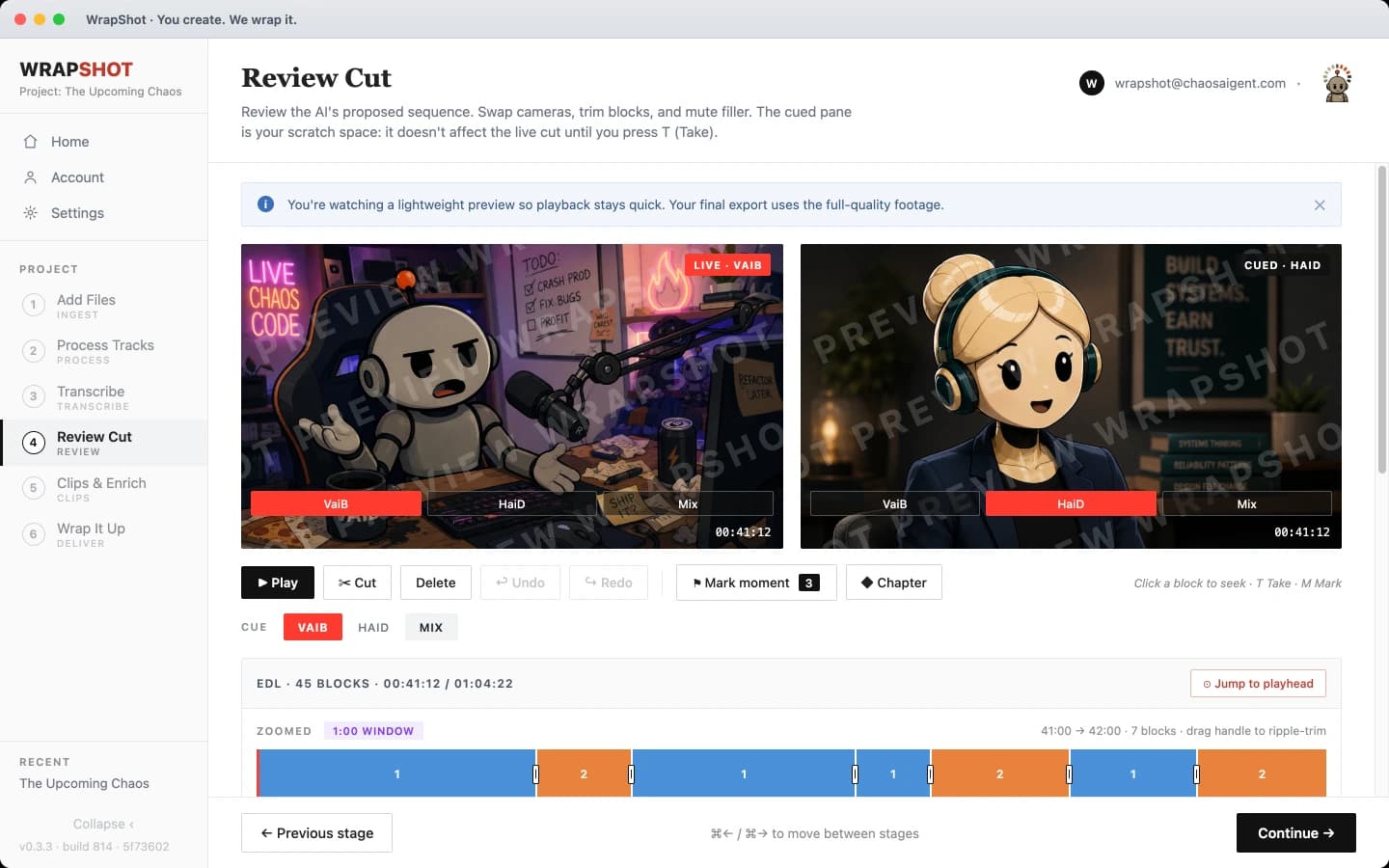
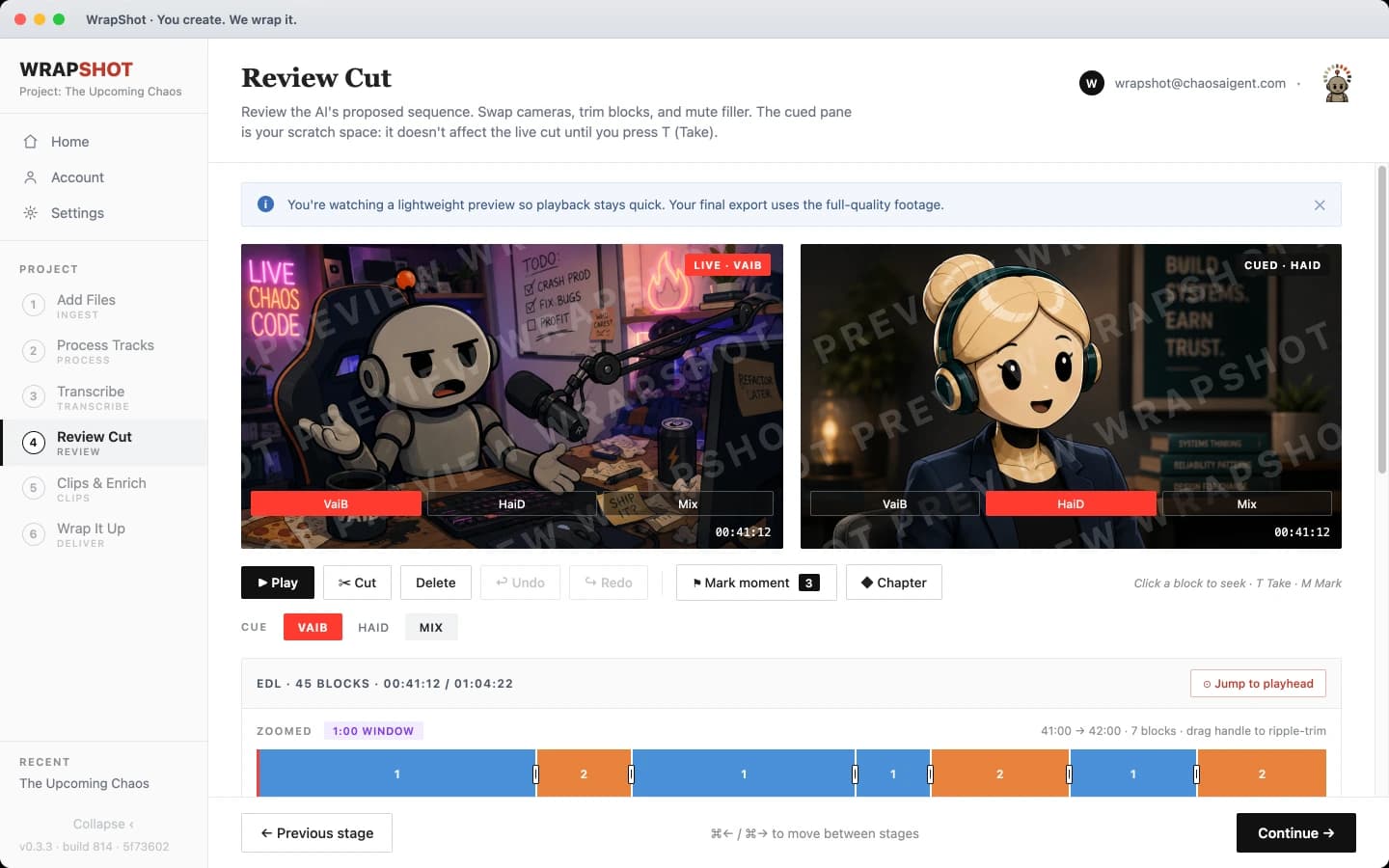
Review Cut
You get a proposed sequence to react to rather than a blank timeline to fill.
- A live pane and a cued pane, so you always see what is coming next
- Filler words flagged in the transcript, muted in one click
- Mark the moments worth clipping as you watch
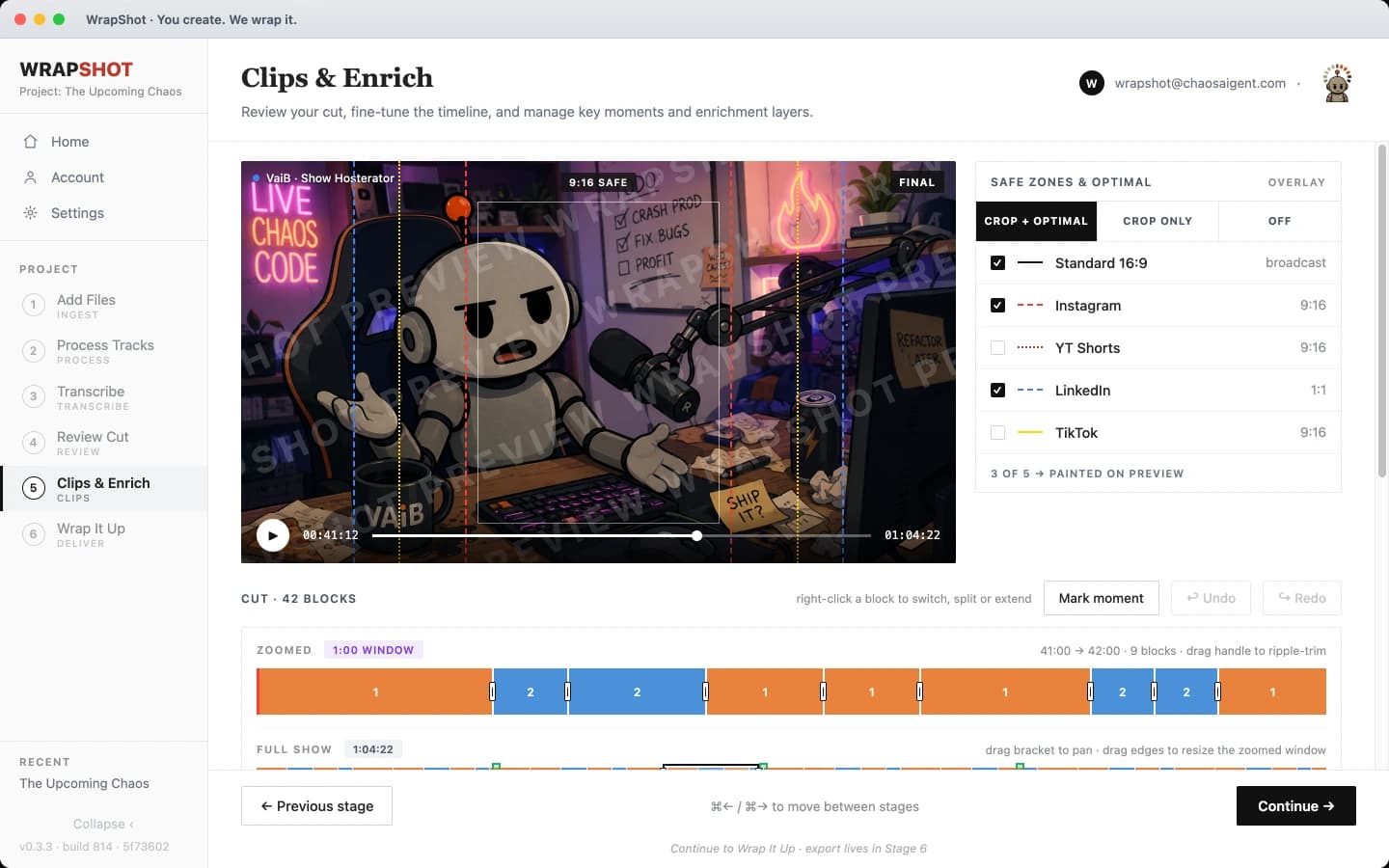
Clips & Enrich
Mark moments to make clips. Each platform's crop is drawn over the preview, so you can see what fits before it renders.
- Guides for Instagram, TikTok, Shorts and LinkedIn
- A vertical, square and wide version of every clip
Wrap It Up
One render makes every file you asked for, so nothing is re-encoded for each platform.
An episode, and everything around it
The master
- Video master
- 720p or 1080p H.264, or a quick draft for review copies
- Audio
- MP3, 192 kbps stereo, podcast ready
Everything around it
Social clips
One vertical, square and wide clip per marked moment
Transcript
Speaker-labelled .txt with timecodes
Subtitles
Standard SRT for any video player
Chapters
YouTube chapters plus a WebVTT cue file
Screens show a preview build.

“I quote per episode. I am not selling an edit, I am selling a date my client can stop worrying about. My hands are on the review, and the machine finishes without me.”
Your footage never leaves your Mac
Transcription, the cut and the render all run on your machine. No footage is uploaded, so an unreleased episode never leaves the room and the work starts the moment you drop the files in.
- It stays on your disk
- Your footage and your guests never leave the machine. There is no copy of your recording on someone else's server.
- No upload, no queue
- Work starts the second you drop the files in, not after a few hundred gigabytes finish climbing your connection, and never behind somebody else's render.
- Signing in needs a connection
- Your recordings never travel over it. WrapShot reads and writes them as files on your own disk.
What else it handles for you
Frame-accurate sync
Audio correlation lines up every feed and reports the offset.
Cuts on who's talking
Set a minimum and maximum shot length and a room threshold. WrapShot proposes the sequence; you approve it.
Cameras without mics
A second angle inherits its speaker's sync, so B-cams and phone shots make it into the timeline too.
Filler detection
Ums, likes and false starts are flagged in the transcript. Mute them all, or keep the ones that sound like you.
Loudness and color
Audio normalized to broadcast, color balanced between feeds so cutting cameras doesn't shift the picture.
Safe zones you can see
Vertical, square and wide crops drawn over the preview, so you see what fits before it renders.
One render, every format
Pick the outputs once. They're all written from a single master pass instead of a re-encode each.
Nothing is final
Every stage stays reachable. Redo one and the stages either side of it are left alone.
Burned-in captions
Styled captions rendered into the picture, so clips read without sound.
Motion graphics
Titles, lower thirds and end cards drawn from your show's own setup.
Help keep it free
Keep the WrapShot Stamp on your exports, and that’s your contribution. Or contribute a few dollars a project and the Stamp comes off, unless you want to keep it.
Nothing is locked either way. Every format, full quality, every stage. A contribution starts at $5 and covers the whole project, not one export: re-export in any format as many times as you want. Nothing renews.
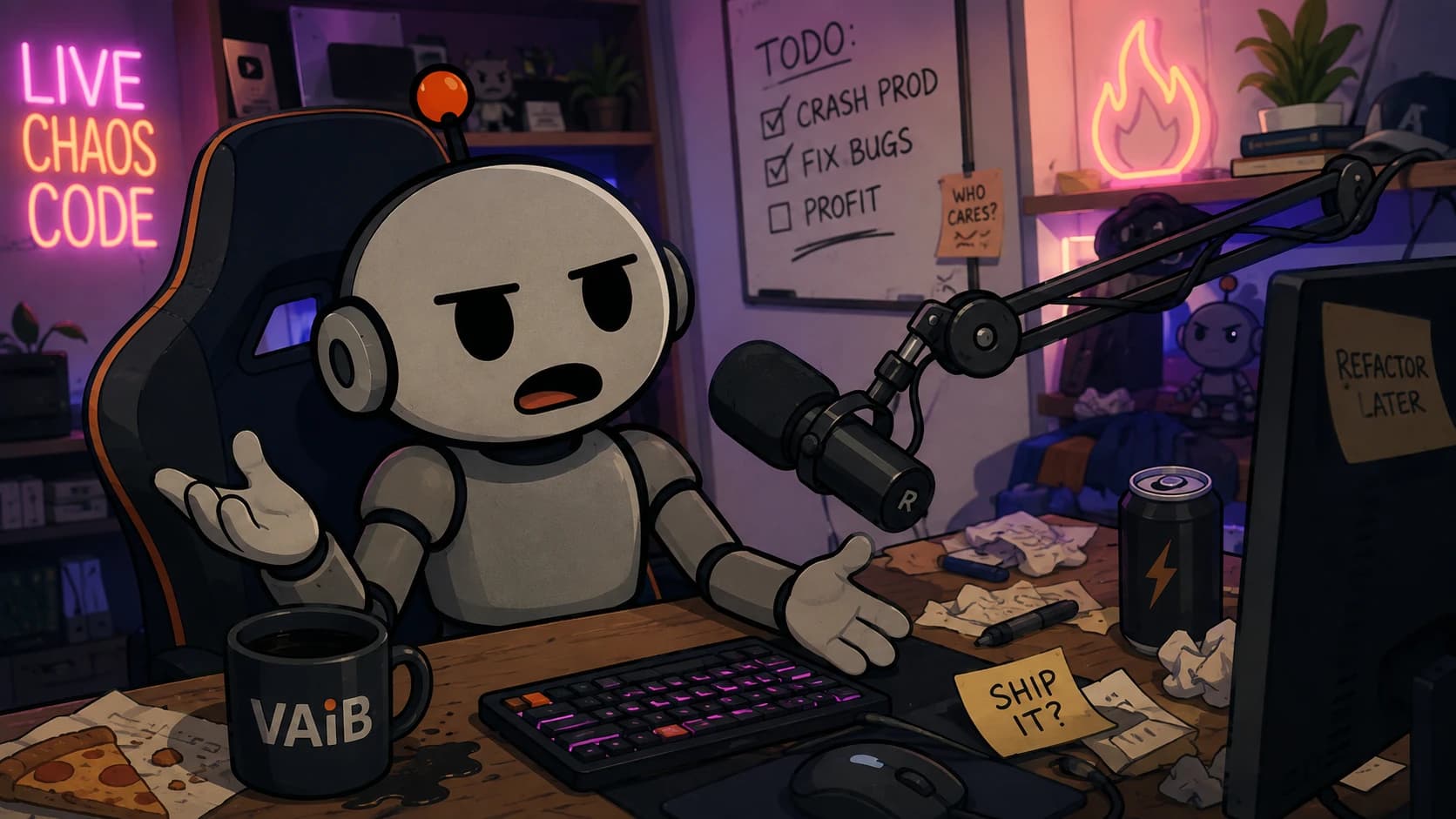 Edited in WrapShot
Contributions are what fund the next thing built.
What arrives pays for the next thing on the list: captions, motion graphics, cloud rendering and the Windows build.
A contribution does not buy a delivery date. $5 is the floor because card processing takes a fixed fee off every payment.
Show WrapShot love
Contributing takes the WrapShot Stamp off your exports. Plenty of contributors leave it on anyway. It tells other creators what you used.
Get the guest, record the thing, and spend as little as possible getting it out.
First-timers
I have never cut multicam and I am not starting on a blank timeline. I want to know this one comes out before I book anybody.
Solo podcasters
I record it and I edit it. I want to stop dreading the part that starts the moment I stop recording.
Podcasting for leads
My guests are referral partners and prospects. I want to look like somebody who finishes things, to exactly those people.
Side hustle
An hour on a Sunday is the whole budget. I want to spend it on the episode, not on the edit.
Agencies
I want every episode to look like the same show, across a client's whole back catalog, without setting it up again each time.
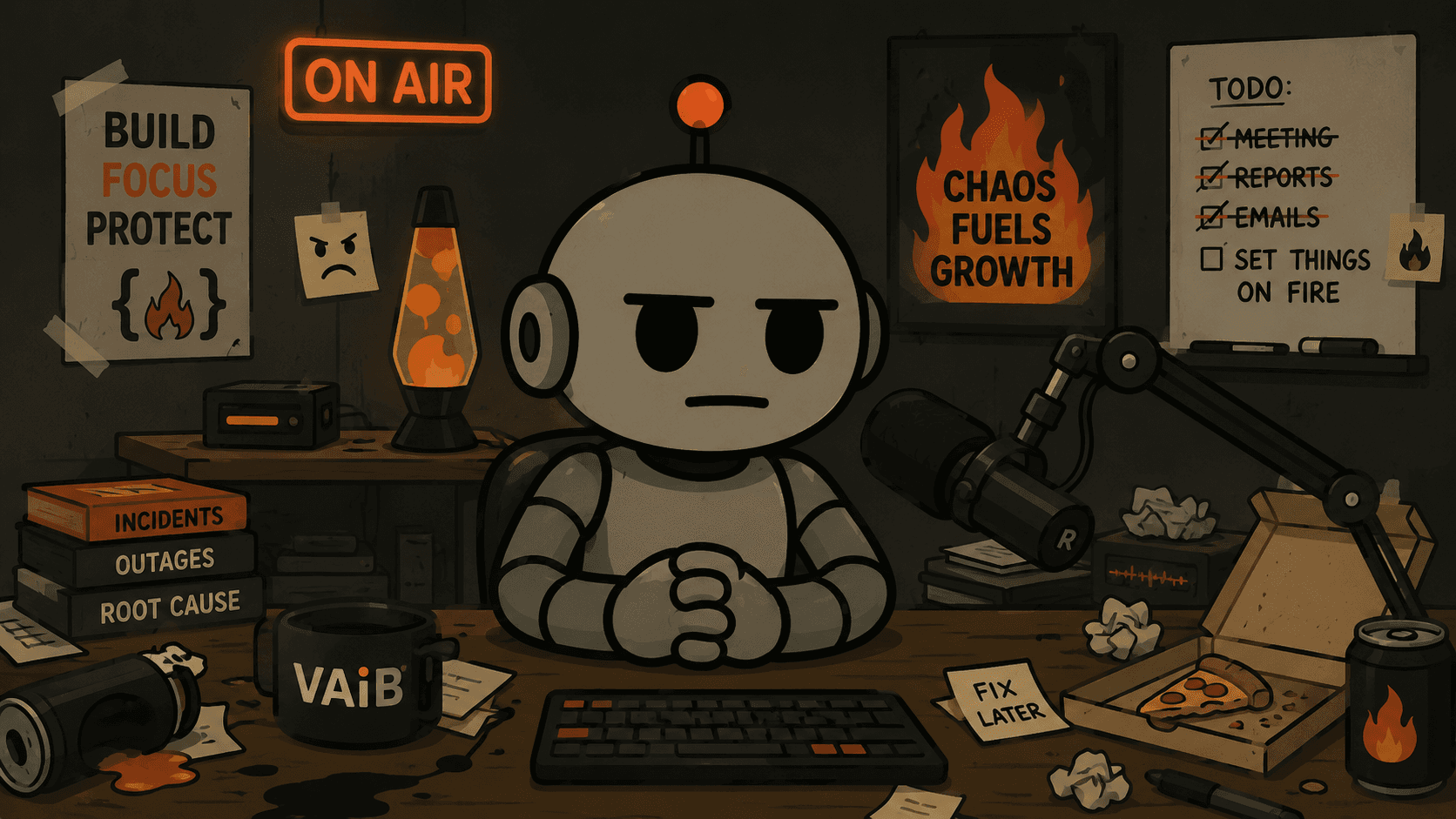
“I have hours of good conversation that never aired. Not because I quit. Because I never finished them.”
I built this so I could enjoy podcasting again
I have used Adobe tools since 1994, and Premiere Pro was the last one I kept for podcasts. It was overkill for the job. Editing was never the hard part. It was the amount of it: too much cost, too much tool, too much workflow to build, until something small had turned into a full-time job.
So the episodes stopped going out. Hey, Good Chat! ended with five conversations sitting on a drive. Pitchslap! got to about twenty recorded and almost none published. My guests were friends, referral partners and prospects, an hour of their time each, and nothing back. That is what not publishing costs.
Pitchslap! is publishing again now, finished in WrapShot, and Technical Errors is running alongside it. The promise here is not speed. It is that the episode comes out, so the months and the money stop being a bet on whether the show exists at all.
There is no company behind it, no subscription, and no plan to get bought. Contributions pay for what gets built next: captions, lower thirds, motion graphics, cloud rendering, and the Windows version. They arrive for projects you have already backed too.
It runs on the Mac you already have
Most video software asks for a new machine with plenty of memory. WrapShot does not. It is built and tested on a 2020 MacBook Air, M1 chip, 8 GB of memory. A full episode runs start to finish on that machine. A faster Mac just gets there sooner.
- Chip
- Apple Silicon, M1 or newer. Intel Macs are not supported.
- Memory
- 8 GB is enough. More memory only shortens the wait.
- Internet
- Needed to sign in. Transcription and rendering run on your machine.
Questions
Does my footage leave my machine?
No. Transcription, diarization and rendering all run locally. Cloud rendering is on the roadmap as an option, not a requirement.
What files can I bring in?
MP4, MOV, MKV, WAV, MP3 and AAC. Riverside, StreamYard and Zoom exports are recognized from their filenames.
How many cameras?
As many as you recorded. Cameras without their own audio inherit a speaker’s sync, so they need to start at the same moment as that speaker.
Can I override the automatic cut?
All of it. Swap the camera on any block, split it, extend it, trim it, or delete it.
What does it cost?
Supporting WrapShot is all we ask, and you choose how. Keep the small WrapShot Stamp on your exports and you owe nothing: full quality, every format, no card, no trial, no time limit. Or contribute from $5 on a project and the Stamp comes off.
What does contributing get me?
The Stamp comes off that project, which stays yours to re-export forever, in any format. Contributions are also the only thing funding what gets built next.
Is there a subscription?
No. A contribution is a one-off on one project. Nothing renews and there’s nothing to cancel. $5 is the minimum only because card processing takes a fixed fee off every payment, and below that the fee eats too much of it.
Mac only?
Yes. WrapShot needs an Apple Silicon Mac to run the whole pipeline on-device (Intel isn’t supported). Windows is on the roadmap, no date yet.
Do I need an account?
Yes, and signing in needs a connection, so a first run cannot complete offline. Your recordings never travel over it. WrapShot reads and writes them as files on your own disk.
How big is the download?
896 MB to download and about 2 GB installed. It is not on the Mac App Store; you download it here. The disk image is signed with an Apple Developer ID and notarized by Apple. On first launch, right-click the app and choose Open; macOS asks once.
Can I take the cut into Premiere or Final Cut?
Not yet. WrapShot renders finished files (video, audio, clips, transcript, subtitles and chapters) rather than a project you open in another editor. Every change happens inside WrapShot, where the cut stays editable until you render it.
How do I report a bug?
Email support@wrapshot.app. Reports are read as time allows.
Get it now
Free to download and free to use. You’ll be asked about contributing at the point you export, and not before.
Download for macOSApple Silicon · v0.4.0
Windows is not ready yet. Want to know when?
A Windows build is one of the things contributions are paying for. It’s on the roadmap. Leave your email and you’ll hear when it ships.